
📘 Lesson 1: Introduction to Python and Numpy#
🎯 Learning Objectives#
Gain an understanding of Python.
Learn about variables and data types.
Explore the structure and application of conditional statements and loops.
Develop and utilize functions.
Prepare Google Colab Environment#
lesson_number = 1
print(f'lesson{lesson_number}')
lesson1
#@title Connect to Google Drive {display-mode:"form"}
CONNECT_TO_DRIVE = False #@param {type:"boolean"}

import os

if CONNECT_TO_DRIVE:
    from google.colab import drive
    # Mount Google Drive
    drive.mount('/content/drive')

    # Define the desired working directory path
    working_dir = '/content/drive/MyDrive/hello-pypsa'

    # Create the directory if it doesn't exist
    if not os.path.exists(working_dir):
        os.makedirs(working_dir)
        print(f"Directory '{working_dir}' created.")
    else:
        print(f"Directory '{working_dir}' already exists.")

    # Change the current working directory
    os.chdir(working_dir)

    print(f"Current working directory: {os.getcwd()}")
else:
    print("Not connecting to Google Drive.")
import os

#@title Install Packages {display-mode:"form"}
INSTALL_PACKAGES = False #@param {type:"boolean"}

# Check if packages have already been installed in this session to prevent re-installation
if INSTALL_PACKAGES and not os.environ.get('PYPSA_PACKAGES_INSTALLED'):
  !pip install pypsa pypsa[excel] folium mapclassify cartopy
  !pip install git+https://github.com/PriyeshGosai/pypsa_network_viewer.git
  os.environ['PYPSA_PACKAGES_INSTALLED'] = 'true'
elif not INSTALL_PACKAGES:
  print("Skipping package installation.")
else:
  print("PyPSA packages are already installed for this session.")
Python#
Python is a multi-purposed programming language. It allows all sorts of activities from building web applications, to coding computer games, to machine learning projects and solving optimization problems (as power system modeling). It is moreover free to use, easy to learn and has a well written documentation and a wide community of contributors.
print('Welcome')
Python packages#
Python offers also a wide range of packages that provide pre-built and tested functions that can be imported in your code. As of July 2024, the Python Package Index PyPI (the official repository of software for the Python programming language), contains over 100000 projects.
📥 Import packages
import numpy as np
import pandas as pd
Variable names#
Every Python variable has a unique name and a value. A variable comes into existence as a result of assigning a value to it. The assign operator is the =. For example
variable = "something"
Display the variable
print(variable)
Data types#
Python offers the following built-in data types to store data into variables. A more comprehensive list is available at this page.
The function type() can be used to return the Python representation.
text_type = 'string'

print(text_type)
print(type(text_type))
numeric_type_float = 3.14

print(numeric_type_float)
print(type(numeric_type_float))
numeric_type_int = int(1)

print(numeric_type_int)
print(type(numeric_type_int))
numeric_type_complex =  4 + 5j

print(numeric_type_complex )
print(type(numeric_type_complex ))
boolean_type = True # or False

print(boolean_type )
print(type(boolean_type ))
none_type = None

print(none_type)
print(type(none_type))
Collection types
Lists
# List of Manchester United players
list_collection = [
    "Bruno Fernandes",
    "Andre Onana",
    "Harry Maguire",
    "Lisandro Martínez",
    "Rasmus Højlund"
]

print(list_collection)

print(type(list_collection))

print(len(list_collection))

print(list_collection[1])

print(list_collection[3])

print(list_collection[-1])
['Bruno Fernandes', 'Andre Onana', 'Harry Maguire', 'Lisandro Martínez', 'Rasmus Højlund']
<class 'list'>
5
Andre Onana
Lisandro Martínez
Rasmus Højlund
Lists can be easily changed (just like Manchester United players). Therefore, if Cristiano Ronaldo were to replace André Onana, we could:
list_collection[1] = "Christiano Ronaldo"
print(list_collection)
['Bruno Fernandes', 'Christiano Ronaldo', 'Harry Maguire', 'Lisandro Martínez', 'Rasmus Højlund']
If Wayne Rooney were to come out of retirement and be added to the start of the squad, we could do:
list_collection.insert(0, "Wayne Rooney")
print(list_collection)
If you were to join the team as the last member (super sub, maybe?), we’d use append. Add your name to the team.
your_name = "You"

list_collection.append("You")
print(list_collection)
Tuples
Unlike lists, tuples are immutable — meaning their values and order cannot be changed once defined. Think of them like a Hall of Fame lineup: you can admire it, reference it, but not rewrite history (at least not without controversy!).
# Tuple of the greatest footballers of all time

tuple_collection = (
    "Pelé",
    "Diego Maradona",
    "Lionel Messi",
    "Cristiano Ronaldo",
    "Johan Cruyff",
    "Zinedine Zidane",
    "Ronaldo Nazário",
    "Michel Platini",
    "Franz Beckenbauer",
    "George Best"
)

print(tuple_collection)
print(type(tuple_collection))
('Pelé', 'Diego Maradona', 'Lionel Messi', 'Cristiano Ronaldo', 'Johan Cruyff', 'Zinedine Zidane', 'Ronaldo Nazário', 'Michel Platini', 'Franz Beckenbauer', 'George Best')
<class 'tuple'>
📌 You can access players from the tuple (e.g., tuple_collection[2] will return “Lionel Messi”), but you cannot modify it directly — no swapping players, no adding new legends.
⚠️ Trying something like tuple_collection[0] = “Mbappé” will raise an error:
TypeError: 'tuple' object does not support item assignment
That’s the trade-off for using tuples — they give you consistency, not flexibility.
Sets
A set in Python is an unordered, unindexed collection of unique items.
Think of it like a box of elements where duplicates aren’t allowed, and there’s no guaranteed order which is useful when membership testing and uniqueness matter more than order.
# A set of the periodic table of elements
set_collection = {"Hydrogen", "Oxygen", "Carbon", "Iron", "Gold", "Uranium"}

print(set_collection)
print(type(set_collection))
Key Properties of Sets:
✅ Unordered: The elements may not appear in the order you defined them.
✅ No duplicates: Repeating “Gold” won’t create a second entry.
Dictionary
A dictionary in Python is a collection of key-value pairs.
It works like a real dictionary — you look up a key (like a word), and get back its value (like a definition).
# Dictionary

import numpy as np

dictionary_collection = {
    "Aardvark": "A nocturnal burrowing mammal native to Africa.",
    "Abacus": "A device used for arithmetic calculations.",
    "Abandon": "To leave something or someone completely."
}
print(dictionary_collection)
print(type(dictionary_collection))

print(type(dictionary_collection))

print(dictionary_collection["Aardvark"])

dictionary_collection["Abacus"] = "An ancient device used for arithmetic calculations."

dictionary_collection["Delulu"] = "Unrealistically hopeful, overly optimistic, or detached from reality, often in a humorous or exaggerated way."

dictionary_collection["Pi"] = {
                                "definition": "",
                                "value" : np.pi}


print(dictionary_collection.keys())
{'Aardvark': 'A nocturnal burrowing mammal native to Africa.', 'Abacus': 'A device used for arithmetic calculations.', 'Abandon': 'To leave something or someone completely.'}
<class 'dict'>
<class 'dict'>
A nocturnal burrowing mammal native to Africa.
dict_keys(['Aardvark', 'Abacus', 'Abandon', 'Delulu', 'Pi'])
Conditional operators#
The building blocks of conditional statements are the conditional operators. Namely:
Equality operator: it is the operator
==. The operator needs two arguments and checks if they are equal. If the two arguments are equal it returnsTrue. If they are not equal, it returnsFalse. Please do not confuse it with the assignment operator=Inequality operator: it is the operator
!=. If the two arguments are equal it returnsFalse. If they are not equal, it returnsTrue.Greater or greater equal: they are respectively the operators
>and>=Lower or lower equal: they are respectively the operators
<and<=
If statement#
The if statement appearance is
variable_a = 100
if variable_a < 5:
    print("variable_a is less than 5")
elif 5 <= variable_a < 50:
    print("variable_a is between (or equal to) 5 and less than 50")
elif 50 <= variable_a < 100:
    print("variable_a is between (or equal to) 50 and less than 100")
else:
    print("variable_a is equal to or greater than 100")
The if statement consists of the following, strictly necessary, elements in this and this order only:
the
ifkeyworda condition (a question or an answer) whose value will be interpreted solely in terms of
TrueandFalsea colon
:followed by a newlinean indented instruction or set of instructions (at least one instruction is absolutely required). The indentation may be achieved in two ways - by inserting a particular number of spaces (the recommendation is to use four spaces of indentation), or by using the tab character.
The if statement may also consists of the following elements in this and this order only:
the
elifkeyword is used to check more than one condition. Anifstatement may contain one or moreelifstatements. Anelifstatement is activated when all previously listed conditions areFalsethe
elsestatement is executed when none of the previous conditions (of theiforelif) isTrue. Such statement is optional and may be omitted. It is however recommended to use it.
The elif or else conditions are commonly refer to as elif or else branch.
Loops#
It is sometimes necessary to repeat an operation several times. Python therefore provides looping techniques. The main ones are the for and while loops.
A for loop repeats an operation as many times as specified. A while loop instead repeats an operation as long as an expression remains True.
for loop#
The for loop allows the browsing of large collections of data item by item. It is made up the following elements:
the
forkeyword opens the loopany variable after the for keyword is the control variable of the loop. Such variable automatically counts the loop’s turns
the
inkeyword introduces a syntax element describing the range of possible values being assigned to the control variablethe
range()function generates the values (by default in ascending order) of the control variable, from 0 to one step prior to the value of its argument. For examplerange(2)generates0, 1. Insteadrange(1,2), only generates1. Other examples arerange(2,8,3), which generates2, 5orrange(-1,2), which generates-1, 0, 1Python demands at least one instruction for the loop’s body. If you do not have any then put the instruction
pass, which simply continues the loopbreak, continue and pass: they are three keywords.
breakexits the loop immediately and unconditionally ends the loop’s operation. The program begins to execute the nearest instruction after the loop’s body.continuebehaves as if the program has suddenly reached the end of the body. The next iteration in the loop is started and the condition expression is tested immediately.passinstead simply does nothing
Please find below some examples of for loops.
for i in range(0, 6):
    print(i)
for i in range(0, 6):
    pass
for i in range(0, 6):
    if i == 4:
        break
    else:
        print(i)
for key in dictionary_collection:
    print(key,dictionary_collection[key])
while loop#
A while loop depends on the verification of a boolean condition, which is checked at the start or at the end of the loop construct. For example
variable_a = 0
while variable_a < 5:
    print(variable_a)
    variable_a += 1
while and for loops may have the else branch too. The loop’s else branch is always executed once, regardless of whether the loop has entered its body or not.
variable_a = 1
while variable_a < 6:
    print(variable_a)
    variable_a += 1
else:
    print("variable_a is greater than 5")
Functions#
Functions are blocks of the computer code that can be name-tagged, so that they be easily executed as many times as needed.
Functions are usually coming from:
Python itself: such functions are usually referred to as
built-inand are coming from Python itself. Theprintfunction is one of this kindModules/Packages: they may come from one or more of Python’s add-ons named modules/packages. Some of the modules/packages come with the default Python installation, whereas others may require separate installation
Custom: each developer can write his/her own functions within the code
Structure of functions
A Python function definition starts with the def keyword. Moreover, a function may have/require a number of arguments. Finally the standard convention in Python is that all functions must have opening and closing parentheses after their names. For example print(). This is the way to distinguish a function name from a variable name. An example function definition is
def sum_numbers(num_a, num_b):
    return num_a + num_b
A function definition does not produce any output by itself. Function should be invoked. A function invocation is given by the function name, followed by the opening and closing parentheses.
sum_numbers(1, 2)
Passing arguments to a function
There are two types of arguments for a function in Python:
Positional arguments: the meaning of the positional arguments depends on the position in which they are provided
Keyword arguments : the meaning of these arguments is taken not from its location (position) but from the special word (keyword) used to identify them. A keyword argument consists of three elements: a keyword identifying the argument, an equal sign (
=) and a value assigned to that argument (provided in quotes). Please note that every keyword arguments has to be put after the last positional argument.
A function example is
print("A", "B")
print("A", "B", sep="-")
In the example above, A and B are positional arguments, whereas sep is a keyword argument.
Function examples
It is then nice to put what we learned so far together into a function. The example below, provides a function that uses control structures to return a result. In particular, given a number, the function returns True if the number is even or False if the number is odd.
The function makes use of the modulo operator %. The operator returns a remainder of a division. For example
3 % 2
or
4 % 2
The function defition is then
def check_if_even_or_odd(num):
    if num % 2 == 0:
        print("The number is even")
        return True
    else:
        print("The number is odd")
        return False
check_if_even_or_odd(2)
check_if_even_or_odd(3)
Classes#
A class is a fundamental concept in object-oriented programming. It enables you to group related data (attributes) and functions (methods) into a single, organized unit. This promotes modularity, code reuse, and abstraction, making complex programs easier to manage and extend.
In the example below, we define a class called PowerPlant. Each plant object has attributes such as its name, capacity, fuel type, and thermal efficiency. The class also includes methods:
One to neatly display all the plant’s attributes, and
Another to calculate the rated fuel flow rate based on a given fuel quality.
🔍 Rated Fuel Flow Calculation (kg/s)#
To compute the rated fuel flow rate \(\dot{m}\) required to produce the plant’s rated capacity:
Formula#
Where:
\(\dot{m}\) = fuel mass flow rate (kg/s)
\(P_{el}\) = electrical output (MW)
\(\eta\) = thermal efficiency (fraction)
\(H_{fuel}\) = fuel energy content (MJ/kg)
# Define a class for a Power Plant
class PowerPlant:
    # Constructor method
    def __init__(self, name, capacity_mw, fuel_type="coal", efficiency=0.35):
        self.name = name                # Attribute: name of the plant
        self.capacity_mw = capacity_mw  # Attribute: plant capacity in MW
        self.fuel_type = fuel_type      # Attribute: type of fuel
        self.efficiency = efficiency    # Attribute: thermal efficiency (0–1)

    # Method: Describe the plant
    def describe(self):
        print(f"Power Plant: {self.name}")
        print(f"Capacity: {self.capacity_mw} MW")
        print(f"Fuel: {self.fuel_type}")
        print(f"Efficiency: {self.efficiency * 100:.1f}%")

    # Method: Calculate rated fuel flow (kg/s) to reach capacity
    def rated_fuel_flow(self, fuel_energy_content_mj_kg=16.0):
        # Rearranged: capacity_mw = fuel_flow_kg_s × MJ/kg × efficiency / 1000
        # Solve for fuel_flow_kg_s:
        fuel_flow_kg_s = self.capacity_mw / (self.efficiency * fuel_energy_content_mj_kg)
        print(f"Rated fuel flow for {self.name}: {fuel_flow_kg_s:.2f} kg/s")
        return fuel_flow_kg_s
# Example usage
plant1 = PowerPlant("Lethabo", 618)  # Uses default fuel and efficiency
plant1.describe()
flow_rate = plant1.rated_fuel_flow()  # Assuming 450 kg/hr of coal input
Classes aren’t just for custom objects — they’re used throughout Python. Many of the built-in types you use every day, like list, dict, and str, are actually classes under the hood.
For example, the list class allows you to store and manipulate ordered collections of items. When you write:
my_list = [1, 2, 3]
You’re actually creating an object of the list class. You can then call methods on it, such as:
my_list.append(4)     # Adds an item
my_list
my_list.pop()         # Removes the last item
my_list
print(len(my_list)) # Uses a method from the class to get length
NumPy#
What is NumPy
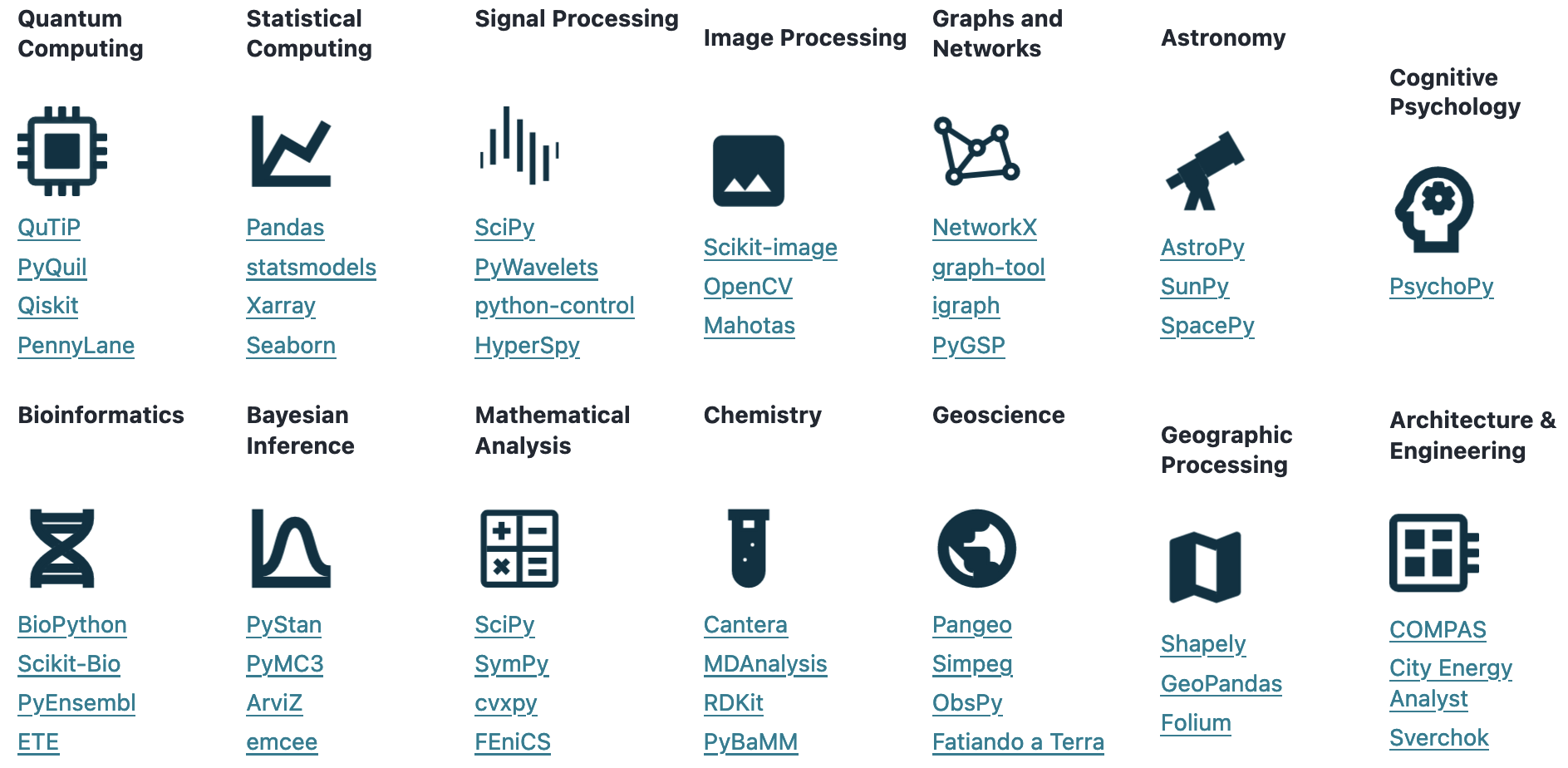
NumPy is a Python package that brings the computational power of languages like C++ and Fortran to Python. NumPy is the backbone of many other Python packages that span several applications, as shown below
from IPython.display import Image
Image("images/numpy_applications.png", width=500)
How to import NumPy
import numpy as np
Why NumPy
NumPy (which is an acronym for Numerical Python) is a multi-dimensional array library. Data can therefore be stored in one-, two- or n-dimensional arrays. The array object in NumPy is referred to as ndarray. NumPy arrays are several times faster than traditional Python lists. This is because (behind the scenes) NumPy is developed in C++. ndarrays are also more efficient with memory usage. This is because Python lists may host several types of data at the same time, whereas ndarrays can only host numerical data. Finally NumPy can run sub-tasks in parallel. There is in fact the possibility to vectorize operations without the need of using for loops to cycle through the array and performing the calculations on each single element.
With respect to terminology:
a scalar can be viewed as a 0-dimension
ndarray, therefore it has no shapea vector can be viewed as a 1-dimension
ndarray, therefore it has shape(n,)a matrix can be viewed as a 2-dimensions
ndarray, therefore it has shape(n, m) and so forth.
scalar = np.array(4)
vector = np.array([1,2,3])
matrix = np.array([[1,2,3], [4,5,6]])

for arr in [scalar, vector, matrix]:
    print("dimensions:", arr.ndim, "| shape:", arr.shape)
This code snippet makes use of the attributes ndim and shape, that return respectively an integer corresponding to the number of dimensions and a tuple of integers corresponding to the array dimensions. The full list of ndarray attributes and methods is available at this link.
NumPy overview
Slicing#
ndarray slicing works as the slicing of lists.
vector = np.array([1,2,3,4,5,6,7])
print(vector)
# the first and the last elements are given by
print(vector[0], vector[-1])
# a slice from the second to the fourth element (included) is given by
vector[1:4]
# a slice from the first to the last element in steps of three is given by
vector[::3]
The slicing works in the same way even for higher dimensions ndarray. Let us consider the matrix
matrix = np.array([[1,2,3,4,5,6,7], [8,9,10,11,12,13,14]])
print(matrix)
# a slice that returns the first row is given by
matrix[0, :]
# a slice that returns the second row is given by
matrix[1, :]
# a slice that returns the second through the fourth columns is instead given by
matrix[:, 2:5]
Slicing is instrumental also when replacing elements of an ndarray. For example, the code to replace the second through the fourth columns with ones is
matrix[:, 2:5] = [[1, 1, 1], [1, 1, 1]]
matrix
Array manipulation#
NumPy provides methods to re-organize and re-shape arrays.
The methods vstack and hstack enable to vertically and horizontally stack existing ndarrays.
vector_one = np.array([1,2,3,4,5,6,7])
vector_two = np.array([8,9,10,11,12,13,14])
# vertical stacking
print(np.vstack([vector_one,vector_two]))
# horizontal stacking
print(np.hstack([vector_one,vector_two]))
The method reshape instead allows to modify the shape of an ndarray
original_matrix = np.vstack([vector_one,vector_two])
original_matrix.shape
original_matrix.reshape((7,2))
Zeros and ones#
The following code snippets can be used to create ndarrays containing only zeros or ones. Namely:
# zeros vector
vector_zeros = np.zeros(5)
print(vector_zeros)
# zeros matrix
matrix_zeros = np.zeros((5,7))
print(matrix_zeros)
# ones vector
vector_ones = np.ones(5)
print(vector_ones)
# ones matrix
matrix_ones = np.ones((5,7))
print(matrix_ones)
Linear algebra#
A NumPy ndarray supports vectorized operations. For example, it is possible to add, subtract, multiply or divide each element of an ndarray using the following compact form (Note: this is not possible with lists)
matrix_ones = np.ones((5,7))
print(matrix_ones + 2)
print(matrix_ones * 4)
print(matrix_ones - 2)
print(matrix_ones / 4)
The extended versions of the code snippets above involve the use of a for loop to cycle through each element of the ndarray.
NumPy provides also a function to perform a matrix multiplication.
matrix_ones = np.ones((5,7))
matrix_threes = (matrix_ones + 3).transpose()

np.matmul(matrix_ones, matrix_threes)
The @ operator can be used as a shorthand for np.matmul on ndarrays.
Other useful operations#
The important statistics of an ndarray can be determined with the following methods
# minimum of an ndarray
vector.min()
# maximum of an ndarray
vector.max()
# mean of an ndarray
vector.mean()
It is also possible to apply these methods to n-dimensional ndarray. For example
# maximum element of the matrix for each column
matrix.max(axis=0)
# maximum element of the matrix for each row
matrix.max(axis=1)
Finally, the all and any return True or False if (respectively) all or any of the elements of the ndarray fulfill a given condition. For example
np.any(vector==9)
np.any(vector==1)
np.all(vector==9)
np.all(vector==1)
np.all(vector_ones==1)
It is also possible to apply these methods to n-dimensional ndarray as well. For example
print("Are all the elements by column of the matrix greater than 0?", np.all(matrix > 0, axis=0))
print("Are all the elements by row of the matrix greater than 0?", np.all(matrix > 0, axis=1))
print("Is any of the elements along the columns of the matrix greater than 6?", np.all(matrix > 6, axis=0))
print("Is any of the elements along the rows of the matrix greater than 6?", np.all(matrix > 6, axis=1))