
Exercise 1: Introduction to PyPSA#
Prepare Google Colab Environment#
import os

#@title Install Packages {display-mode:"form"}
INSTALL_PACKAGES = False #@param {type:"boolean"}

# Check if packages have already been installed in this session to prevent re-installation
if INSTALL_PACKAGES and not os.environ.get('PYPSA_PACKAGES_INSTALLED'):
  !pip install pypsa pypsa[excel] folium mapclassify cartopy
  !pip install git+https://github.com/PriyeshGosai/pypsa_network_viewer.git
  os.environ['PYPSA_PACKAGES_INSTALLED'] = 'true'
elif not INSTALL_PACKAGES:
  print("Skipping package installation.")
else:
  print("PyPSA packages are already installed for this session.")
Exercise 1.1#
Objective:
Programatically build a PyPSA network, define the model’s constraints, solve it, and review the results.
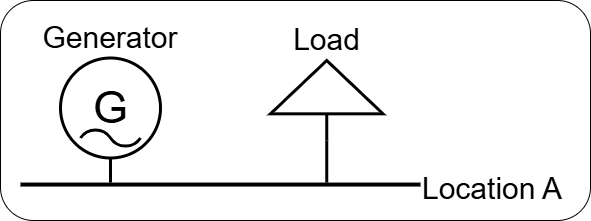
Diagram
print("PyPSA Model")
PyPSA Model
import pypsa
import pandas as pd
import numpy as np
pypsa.options.api.new_components_api = True

snapshots_df = pd.date_range('2025-01-01 00:00', '2025-12-31 23:00', freq='h')
load_profile = np.random.rand(len(snapshots_df)) * 100

n = pypsa.Network()
n.set_snapshots(snapshots_df)
n.add('Carrier',['gas','AC'])
n.add('Bus','Location',carrier = 'AC')

n.add('Load',
      'Load A',
      bus = 'Location',
      p_set = load_profile,
      carrier = 'gas')

n.add('Generator',
      'Generator A',
      bus = 'Location',
      p_nom = 10,
      marginal_cost = 1,
      p_nom_extendable = True)
n.generators.static.p_nom_opt
n.generators.static
n.loads.static
n.buses.static
n.optimize()
n.generators.static
n.objective_constant
n.buses.dynamic.marginal_price.sum()
n.snapshot_weightings
n.objective
for key in n.buses.dynamic:
    print(key)
n.loads
n.objective
Exercise 1.2#
In this example, we will use an example network distributed with PyPSA to observe more complex features.
Meshed AC–DC Network Optimisation in PyPSA#
This example demonstrates how to optimise a meshed AC–DC network in PyPSA.
The network contains a 3-node AC system connected via AC–DC converters to a 3-node DC system.
There is also a point-to-point DC connection represented using the Link component.
Reference example:
https://docs.pypsa.org/latest/examples/ac-dc-lopf/
import pypsa
pypsa.options.api.new_components_api = True

# Fix for pandas 2.3.0 StringDtype incompatibility with PyPSA plotting
import pandas as pd
pd.options.future.infer_string = False

network = pypsa.examples.ac_dc_meshed()
network.carriers.static
network.carriers.static
network.global_constraints.static
network.generators.static.efficiency
network.generators.static.p_nom_extendable
network.generators.static
# line_color = network.lines.static.bus0.map(network.buses.static.carrier).map(
#     lambda ct: "r" if ct == "DC" else "b"
# ).astype(object)

# network.plot.explore(
#     # line_color=line_color,
#     link_color="c",
#     jitter=0.4,
# )
network.determine_network_topology()
network.snapshots
network.buses.static
network.generators.static
network.generators.dynamic.p_max_pu
network.lines.static
network.links.static
network.loads.static
network.loads.dynamic.p_set
network.loads.dynamic.p_set.plot()
network.global_constraints.static
network.sub_networks.static
network.sub_networks.static.loc['0','obj']
network.sub_networks.static.loc['0','obj'].components.buses.static
Solve the model
network.optimize()
View all the constraints
network.model
View Results
network.generators.dynamic.p.plot()
network.links.dynamic.p0.plot()
network.lines.dynamic.p0.plot()
network.export_to_excel('exercise_1.xlsx')
network.export_to_netcdf('exercise_1.nc')
# from pypsa_network_viewer import html_network , generate_template

# html_file = html_network(
#     n,
#     file_name='exercise_1_network.html',
#     title='Exercise 1 Analysis'
# )
# generate_template('test_template.xlsx')